Welcome to your journey into Java programming! In this codelab, you'll learn the foundational concepts that power all Java applications - from understanding how the JVM works to writing your first programs using control flow structures.
What You'll Learn
- Java Platform architecture (JVM, JRE, JDK)
- JVM internal architecture and how Java code executes
- Primitive data types, arrays, and operators
- Control flow with if-else, switch, loops
- Building interactive console applications
What You'll Build
A feature-rich Calculator Application with:
- Menu-driven interface
- Basic arithmetic operations
- Calculation history using arrays
- Input validation and error handling
- Clean, interactive user experience
Prerequisites
- Basic understanding of programming concepts
- A computer with admin access to install software
- Willingness to learn and experiment!
Let's set up your Java development environment.
Install JDK
- Visit the Oracle JDK Downloads or OpenJDK
- Download JDK 17 or higher for your operating system
- Run the installer and follow the installation wizard
- Note the installation path (e.g.,
C:\Program Files\Java\jdk-17on Windows)
Configure Environment Variables
Windows:
- Open System Properties → Advanced → Environment Variables
- Add new System Variable:
- Variable name:
JAVA_HOME - Variable value:
C:\Program Files\Java\jdk-17(your JDK path)
- Variable name:
- Edit
Pathvariable, add:%JAVA_HOME%\bin
macOS/Linux:
Add to ~/.bashrc or ~/.zshrc:
export JAVA_HOME=/usr/lib/jvm/java-17-openjdk
export PATH=$JAVA_HOME/bin:$PATH
Verify Installation
Open a new terminal and run:
$ java -version
java version "17.0.1" 2021-10-19 LTS

$ javac -version
javac 17.0.1
Install an IDE (Recommended)
While you can use any text editor, an IDE makes Java development much easier:
Before writing code, let's understand what makes Java special - its platform architecture.
The Java Ecosystem: JVM, JRE, JDK
Java's power comes from its three-tier architecture:
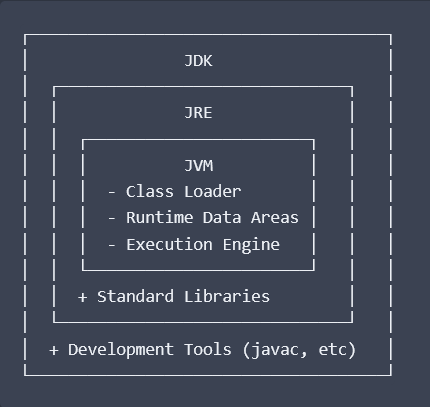
JVM (Java Virtual Machine):
- The runtime engine that executes Java bytecode
- Provides platform independence ("Write Once, Run Anywhere")
- Manages memory and garbage collection
- Provides security through bytecode verification
JRE (Java Runtime Environment):
- JVM + Standard Java libraries (java.lang, java.util, etc.)
- Everything needed to run Java applications
- No development tools included
JDK (Java Development Kit):
- JRE + Development tools (compiler, debugger, etc.)
- Everything needed to develop Java applications
- Includes
javac,jar,javadoc, and more
JVM Architecture Deep Dive
Understanding JVM internals helps you write better Java code:
1. Class Loader Subsystem:
- Loading: Reads
.classfiles and loads bytecode - Linking: Verifies bytecode, prepares memory for static variables
- Initialization: Executes static initializers and static blocks
2. Runtime Data Areas:
- Method Area: Stores class metadata, static variables, method bytecode
- Heap: Stores all objects and instance variables (garbage collected)
- Stack: Stores method calls, local variables, and partial results (per thread)
- PC Register: Current instruction pointer (per thread)
- Native Method Stack: For native (non-Java) method calls
3. Execution Engine:
- Interpreter: Executes bytecode line by line
- JIT Compiler: Compiles hot code to native machine code for performance
- Garbage Collector: Automatically reclaims unused memory
How Java Code Executes
Source Code (.java)  →  Compiler (javac)  →  Bytecode (.class)
                                                    ↓
                                          JVM loads and executes
                                                    ↓
                                          Your program runs!
Explore JDK Tools
Let's use some JDK tools:
$ javac --help
Usage: javac <options> <source files>

$ java --help
Usage: java [options] <mainclass> [args...]

$ jconsole
(Opens Java monitoring console)
Java is a strongly-typed language - every variable has a specific type. Let's explore Java's data types.
Primitive Data Types
Java has 8 primitive types:
Type | Size | Range | Default | Example |
| 8-bit | -128 to 127 | 0 |
|
| 16-bit | -32,768 to 32,767 | 0 |
|
| 32-bit | -2³¹ to 2³¹-1 | 0 |
|
| 64-bit | -2⁶³ to 2⁶³-1 | 0L |
|
| 32-bit | ~±3.4E38 | 0.0f |
|
| 64-bit | ~±1.7E308 | 0.0 |
|
| 16-bit | 0 to 65,535 | ‘\u0000' |
|
| 1-bit | true/false | false |
|
Variable Declaration and Initialization
// Declaration
int count;

// Initialization
count = 10;

// Declaration + Initialization
int age = 25;

// Multiple variables
int x = 1, y = 2, z = 3;

// Constants (final keyword)
final double PI = 3.14159;
final int MAX_USERS = 100;
Type Casting
Implicit (Widening) Casting:
int myInt = 9;
double myDouble = myInt;  // Automatic: int → double
System.out.println(myDouble);  // 9.0
Explicit (Narrowing) Casting:
double myDouble = 9.78;
int myInt = (int) myDouble;  // Manual: double → int
System.out.println(myInt);  // 9 (fractional part lost!)
Arrays
Arrays store multiple values of the same type:
// Declaration and initialization
int[] numbers = {1, 2, 3, 4, 5};

// Declaration with size
String[] names = new String[3];
names[0] = "Alice";
names[1] = "Bob";
names[2] = "Charlie";

// Multi-dimensional arrays
int[][] matrix = {
    {1, 2, 3},
    {4, 5, 6},
    {7, 8, 9}
};

// Array length
System.out.println(numbers.length);  // 5
Operators
Arithmetic Operators:
int a = 10, b = 3;
System.out.println(a + b);  // 13 (addition)
System.out.println(a - b);  // 7  (subtraction)
System.out.println(a * b);  // 30 (multiplication)
System.out.println(a / b);  // 3  (division - integer)
System.out.println(a % b);  // 1  (modulus/remainder)
Comparison Operators:
int x = 5, y = 10;
System.out.println(x == y);  // false (equal to)
System.out.println(x != y);  // true  (not equal)
System.out.println(x > y);   // false (greater than)
System.out.println(x < y);   // true  (less than)
System.out.println(x >= y);  // false (greater or equal)
System.out.println(x <= y);  // true  (less or equal)
Logical Operators:
boolean sunny = true;
boolean warm = false;

System.out.println(sunny && warm);  // false (AND)
System.out.println(sunny || warm);  // true  (OR)
System.out.println(!sunny);         // false (NOT)
Increment/Decrement:
int count = 5;
count++;        // Post-increment: count = 6
++count;        // Pre-increment: count = 7
count--;        // Post-decrement: count = 6
--count;        // Pre-decrement: count = 5
Hands-On: Variable Playground
Create a file VariableDemo.java:
public class VariableDemo {
    public static void main(String[] args) {
        // Primitive types
        int age = 25;
        double salary = 50000.50;
        char grade = 'A';
        boolean isEmployed = true;

        // Arrays
        String[] skills = {"Java", "Spring", "SQL"};

        // Operations
        int yearsOfExperience = 3;
        double bonus = salary * 0.10;  // 10% bonus

        // Output
        System.out.println("Age: " + age);
        System.out.println("Salary: $" + salary);
        System.out.println("Bonus: $" + bonus);
        System.out.println("Grade: " + grade);
        System.out.println("Employed: " + isEmployed);
        System.out.println("Skills: " + skills[0] + ", " + skills[1] + ", " + skills[2]);
    }
}
Compile and run:
$ javac VariableDemo.java
$ java VariableDemo
Age: 25
Salary: $50000.5
Bonus: $5000.05
Grade: A
Employed: true
Skills: Java, Spring, SQL
Control flow determines the order in which code executes. Let's start with branching statements.
If-Else Statement
int score = 85;

if (score >= 90) {
    System.out.println("Grade: A");
} else if (score >= 80) {
    System.out.println("Grade: B");
} else if (score >= 70) {
    System.out.println("Grade: C");
} else if (score >= 60) {
    System.out.println("Grade: D");
} else {
    System.out.println("Grade: F");
}
Ternary Operator (Shorthand):
int age = 20;
String category = (age >= 18) ? "Adult" : "Minor";
System.out.println(category);  // Adult
Switch Statement (Traditional)
int day = 3;
String dayName;

switch (day) {
    case 1:
        dayName = "Monday";
        break;
    case 2:
        dayName = "Tuesday";
        break;
    case 3:
        dayName = "Wednesday";
        break;
    case 4:
        dayName = "Thursday";
        break;
    case 5:
        dayName = "Friday";
        break;
    case 6:
        dayName = "Saturday";
        break;
    case 7:
        dayName = "Sunday";
        break;
    default:
        dayName = "Invalid day";
}

System.out.println(dayName);  // Wednesday
Switch Expression (Java 14+)
Modern Java offers cleaner switch syntax:
int day = 3;
String dayName = switch (day) {
    case 1 -> "Monday";
    case 2 -> "Tuesday";
    case 3 -> "Wednesday";
    case 4 -> "Thursday";
    case 5 -> "Friday";
    case 6 -> "Saturday";
    case 7 -> "Sunday";
    default -> "Invalid day";
};

System.out.println(dayName);  // Wednesday
Multiple Cases:
String dayType = switch (day) {
    case 1, 2, 3, 4, 5 -> "Weekday";
    case 6, 7 -> "Weekend";
    default -> "Invalid";
};
Hands-On: Grade Calculator
Create GradeCalculator.java:
import java.util.Scanner;

public class GradeCalculator {
    public static void main(String[] args) {
        Scanner scanner = new Scanner(System.in);

        System.out.print("Enter your score (0-100): ");
        int score = scanner.nextInt();

        // Validation
        if (score < 0 || score > 100) {
            System.out.println("Invalid score! Must be between 0 and 100.");
            return;
        }

        // Grade calculation
        String grade;
        String message;

        if (score >= 90) {
            grade = "A";
            message = "Excellent!";
        } else if (score >= 80) {
            grade = "B";
            message = "Good job!";
        } else if (score >= 70) {
            grade = "C";
            message = "Satisfactory";
        } else if (score >= 60) {
            grade = "D";
            message = "Needs improvement";
        } else {
            grade = "F";
            message = "Please study harder";
        }

        System.out.println("Grade: " + grade);
        System.out.println("Comment: " + message);

        // Pass/Fail status using ternary
        String status = (score >= 60) ? "PASS" : "FAIL";
        System.out.println("Status: " + status);

        scanner.close();
    }
}
Run and test:
$ javac GradeCalculator.java
$ java GradeCalculator
Enter your score (0-100): 85
Grade: B
Good job!
Status: PASS
Loops execute code repeatedly. Java provides several types of loops.
For Loop
Classic For Loop:
// Syntax: for (initialization; condition; update)
for (int i = 0; i < 5; i++) {
    System.out.println("Count: " + i);
}

// Output:
// Count: 0
// Count: 1
// Count: 2
// Count: 3
// Count: 4
Enhanced For Loop (For-Each):
String[] fruits = {"Apple", "Banana", "Cherry"};

for (String fruit : fruits) {
    System.out.println(fruit);
}
Nested Loops:
// Multiplication table
for (int i = 1; i <= 5; i++) {
    for (int j = 1; j <= 5; j++) {
        System.out.print(i * j + "\t");
    }
    System.out.println();  // New line after each row
}
While Loop
Executes while condition is true:
int count = 0;

while (count < 5) {
    System.out.println("Count: " + count);
    count++;
}
Example: User Input Loop:
Scanner scanner = new Scanner(System.in);
String input = "";

while (!input.equals("quit")) {
    System.out.print("Enter command (or 'quit'): ");
    input = scanner.nextLine();
    System.out.println("You entered: " + input);
}
Do-While Loop
Executes at least once, then checks condition:
int count = 0;

do {
    System.out.println("Count: " + count);
    count++;
} while (count < 5);
Loop Control Statements
Break - Exit loop immediately:
for (int i = 0; i < 10; i++) {
    if (i == 5) {
        break;  // Exits loop when i is 5
    }
    System.out.println(i);
}
// Output: 0 1 2 3 4
Continue - Skip current iteration:
for (int i = 0; i < 10; i++) {
    if (i % 2 == 0) {
        continue;  // Skip even numbers
    }
    System.out.println(i);
}
// Output: 1 3 5 7 9
Hands-On: Array Sum Calculator
Create ArraySumCalculator.java:
public class ArraySumCalculator {
    public static void main(String[] args) {
        int[] numbers = {10, 20, 30, 40, 50};

        // Calculate sum using for loop
        int sum = 0;
        for (int i = 0; i < numbers.length; i++) {
            sum += numbers[i];
        }
        System.out.println("Sum (for loop): " + sum);

        // Calculate sum using for-each loop
        int sum2 = 0;
        for (int num : numbers) {
            sum2 += num;
        }
        System.out.println("Sum (for-each): " + sum2);

        // Find maximum value
        int max = numbers[0];
        for (int num : numbers) {
            if (num > max) {
                max = num;
            }
        }
        System.out.println("Maximum: " + max);

        // Find minimum value
        int min = numbers[0];
        for (int num : numbers) {
            if (num < min) {
                min = num;
            }
        }
        System.out.println("Minimum: " + min);

        // Calculate average
        double average = (double) sum / numbers.length;
        System.out.println("Average: " + average);
    }
}
Run it:
$ javac ArraySumCalculator.java
$ java ArraySumCalculator
Sum (for loop): 150
Sum (for-each): 150
Maximum: 50
Minimum: 10
Average: 30.0
Now let's combine everything into a complete project! We'll build a menu-driven calculator with history.
Project Structure
Create a new file CalculatorApp.java:
import java.util.Scanner;

public class CalculatorApp {
    // Constants
    private static final int MAX_HISTORY = 10;

    // History storage
    private static String[] history = new String[MAX_HISTORY];
    private static int historyCount = 0;

    public static void main(String[] args) {
        Scanner scanner = new Scanner(System.in);
        boolean running = true;

        System.out.println("=================================");
        System.out.println("   ADVANCED CALCULATOR v1.0");
        System.out.println("=================================");

        while (running) {
            printMenu();
            int choice = getChoice(scanner);

            switch (choice) {
                case 1 -> performAddition(scanner);
                case 2 -> performSubtraction(scanner);
                case 3 -> performMultiplication(scanner);
                case 4 -> performDivision(scanner);
                case 5 -> performModulus(scanner);
                case 6 -> performPower(scanner);
                case 7 -> displayHistory();
                case 8 -> clearHistory();
                case 9 -> {
                    System.out.println("Thank you for using Calculator!");
                    running = false;
                }
                default -> System.out.println("Invalid choice! Try again.");
            }

            System.out.println();  // Blank line for readability
        }

        scanner.close();
    }

    private static void printMenu() {
        System.out.println("\n--- MENU ---");
        System.out.println("1. Addition (+)");
        System.out.println("2. Subtraction (-)");
        System.out.println("3. Multiplication (*)");
        System.out.println("4. Division (/)");
        System.out.println("5. Modulus (%)");
        System.out.println("6. Power (^)");
        System.out.println("7. Show History");
        System.out.println("8. Clear History");
        System.out.println("9. Exit");
        System.out.print("Enter your choice: ");
    }

    private static int getChoice(Scanner scanner) {
        while (!scanner.hasNextInt()) {
            System.out.print("Invalid input! Enter a number: ");
            scanner.next();  // Clear invalid input
        }
        return scanner.nextInt();
    }

    private static double getNumber(Scanner scanner, String prompt) {
        System.out.print(prompt);
        while (!scanner.hasNextDouble()) {
            System.out.print("Invalid input! Enter a number: ");
            scanner.next();
        }
        return scanner.nextDouble();
    }

    private static void performAddition(Scanner scanner) {
        double num1 = getNumber(scanner, "Enter first number: ");
        double num2 = getNumber(scanner, "Enter second number: ");
        double result = num1 + num2;

        String calculation = num1 + " + " + num2 + " = " + result;
        System.out.println("Result: " + calculation);
        addToHistory(calculation);
    }

    private static void performSubtraction(Scanner scanner) {
        double num1 = getNumber(scanner, "Enter first number: ");
        double num2 = getNumber(scanner, "Enter second number: ");
        double result = num1 - num2;

        String calculation = num1 + " - " + num2 + " = " + result;
        System.out.println("Result: " + calculation);
        addToHistory(calculation);
    }

    private static void performMultiplication(Scanner scanner) {
        double num1 = getNumber(scanner, "Enter first number: ");
        double num2 = getNumber(scanner, "Enter second number: ");
        double result = num1 * num2;

        String calculation = num1 + " * " + num2 + " = " + result;
        System.out.println("Result: " + calculation);
        addToHistory(calculation);
    }

    private static void performDivision(Scanner scanner) {
        double num1 = getNumber(scanner, "Enter dividend: ");
        double num2 = getNumber(scanner, "Enter divisor: ");

        if (num2 == 0) {
            System.out.println("Error: Cannot divide by zero!");
            addToHistory(num1 + " / " + num2 + " = ERROR (division by zero)");
            return;
        }

        double result = num1 / num2;
        String calculation = num1 + " / " + num2 + " = " + result;
        System.out.println("Result: " + calculation);
        addToHistory(calculation);
    }

    private static void performModulus(Scanner scanner) {
        double num1 = getNumber(scanner, "Enter first number: ");
        double num2 = getNumber(scanner, "Enter second number: ");

        if (num2 == 0) {
            System.out.println("Error: Cannot perform modulus by zero!");
            addToHistory(num1 + " % " + num2 + " = ERROR (modulus by zero)");
            return;
        }

        double result = num1 % num2;
        String calculation = num1 + " % " + num2 + " = " + result;
        System.out.println("Result: " + calculation);
        addToHistory(calculation);
    }

    private static void performPower(Scanner scanner) {
        double base = getNumber(scanner, "Enter base: ");
        double exponent = getNumber(scanner, "Enter exponent: ");
        double result = Math.pow(base, exponent);

        String calculation = base + " ^ " + exponent + " = " + result;
        System.out.println("Result: " + calculation);
        addToHistory(calculation);
    }

    private static void addToHistory(String calculation) {
        if (historyCount < MAX_HISTORY) {
            history[historyCount] = calculation;
            historyCount++;
        } else {
            // Shift array left to make room for new entry
            for (int i = 0; i < MAX_HISTORY - 1; i++) {
                history[i] = history[i + 1];
            }
            history[MAX_HISTORY - 1] = calculation;
        }
    }

    private static void displayHistory() {
        System.out.println("\n--- CALCULATION HISTORY ---");

        if (historyCount == 0) {
            System.out.println("No calculations yet!");
            return;
        }

        for (int i = 0; i < historyCount; i++) {
            System.out.println((i + 1) + ". " + history[i]);
        }
    }

    private static void clearHistory() {
        historyCount = 0;
        // Optional: null out array entries for garbage collection
        for (int i = 0; i < MAX_HISTORY; i++) {
            history[i] = null;
        }
        System.out.println("History cleared!");
    }
}
Understanding the Code
Key Concepts Applied:
- Constants:
MAX_HISTORYdefines maximum history entries - Arrays: Store calculation history
- Control Flow: Menu loop with switch-case
- Methods: Organized code into reusable functions
- Input Validation: Check for valid numbers and division by zero
- String Manipulation: Build calculation strings
Advanced Techniques:
- Switch expressions (Java 14+) for cleaner code
- Array shifting to maintain fixed-size history
- Defensive programming with input validation
- User-friendly interface with clear prompts
Compile and Run
$ javac CalculatorApp.java
$ java CalculatorApp
Test Your Calculator
Try these scenarios:
- Basic operations: Test all arithmetic operations
- Division by zero: Enter 10 / 0 (should show error)
- History feature: Perform several calculations, then view history
- History overflow: Perform more than 10 calculations (oldest should be removed)
- Invalid input: Try entering text instead of numbers
- Clear history: Test the clear function
Sample Session:
=================================
   ADVANCED CALCULATOR v1.0
=================================

--- MENU ---
1. Addition (+)
2. Subtraction (-)
3. Multiplication (*)
4. Division (/)
5. Modulus (%)
6. Power (^)
7. Show History
8. Clear History
9. Exit
Enter your choice: 1
Enter first number: 25
Enter second number: 17
Result: 25.0 + 17.0 = 42.0

--- MENU ---
Enter your choice: 6
Enter base: 2
Enter exponent: 10
Result: 2.0 ^ 10.0 = 1024.0

--- MENU ---
Enter your choice: 7

--- CALCULATION HISTORY ---
1. 25.0 + 17.0 = 42.0
2. 2.0 ^ 10.0 = 1024.0
Let's ensure your calculator works correctly and fix common issues.
Comprehensive Testing Checklist
Functional Testing:
- [ ] All arithmetic operations work correctly
- [ ] Menu navigation functions properly
- [ ] History stores calculations
- [ ] History clears when requested
- [ ] Exit option terminates program cleanly
Edge Cases:
- [ ] Division by zero shows error (not crash)
- [ ] Modulus by zero shows error
- [ ] Negative numbers work correctly
- [ ] Decimal numbers work correctly
- [ ] Very large numbers (test with 999999999999)
- [ ] History overflow (test with 15+ calculations)
Input Validation:
- [ ] Invalid menu choices handled gracefully
- [ ] Text input for numbers rejected
- [ ] Empty input handled
Common Issues and Solutions
Issue 1: "Cannot find symbol" error
CalculatorApp.java:15: error: cannot find symbol
    Scanner scanner = new Scanner(System.in);
    ^
Solution: Add import statement at the top:
import java.util.Scanner;
Issue 2: Switch expression not working
error: illegal start of expression
    case 1 -> performAddition(scanner);
           ^
Solution: You're using Java version < 14. Either:
- Update to JDK 17+ (recommended)
- Or use traditional switch with
breakstatements
Issue 3: History not showing after MAX_HISTORY entries
Solution: Check that array shifting logic is correct in addToHistory() method.
Issue 4: Program crashes on invalid input
Solution: Use scanner.hasNextInt() or scanner.hasNextDouble() before reading input.
Performance Considerations
Our calculator is efficient for its size, but note:
- Array shifting in history is O(n) - acceptable for small arrays
- For larger history, consider using ArrayList (covered in Codelab 1.4)
- String concatenation in loops is slow - for complex scenarios, use StringBuilder
Extending the Calculator
Want to add more features? Try:
- Scientific functions: sin, cos, tan, sqrt, log
- Memory functions: Store and recall values
- Multi-operand calculations: Support expressions like "1 + 2 + 3"
- Persistent history: Save/load history to file (see Codelab 1.3)
- GUI version: Use Swing or JavaFX
Congratulations! 🎉 You've completed the Java Fundamentals & Control Flow codelab!
What You've Learned
- ✅ Java Platform: Understanding JVM, JRE, and JDK architecture
- ✅ JVM Internals: Class loading, memory areas, execution engine
- ✅ Data Types: Primitives, arrays, operators, and type casting
- ✅ Control Flow: if-else, switch expressions, for/while/do-while loops
- ✅ Practical Application: Built a complete calculator with history
- ✅ Best Practices: Input validation, error handling, code organization
Key Takeaways
- Java's platform independence comes from the JVM executing bytecode
- Strong typing prevents many errors at compile-time
- Control flow structures (branching, loops) enable complex logic
- Arrays store multiple values but have fixed size
- Methods organize code into reusable, testable units
- User input must always be validated for robustness
Next Steps
Ready for more? Continue to:
- Codelab 1.2: Object-Oriented Programming - Classes, inheritance, polymorphism
- Codelab 1.3: Exception Handling & File I/O - Robust error handling
- Codelab 1.4: Collections Framework - Dynamic data structures
Practice Exercises
Before moving on, try these challenges:
- Enhanced Calculator: Add square root, factorial, and percentage functions
- Number Guessing Game: Computer picks random number, user guesses with hints
- Prime Number Checker: Determine if a number is prime
- Fibonacci Sequence: Generate first N Fibonacci numbers
- Array Sorter: Implement bubble sort or selection sort